

GCMS Notes Sample
A GCMS notes report is a multi-page PDF document that includes officer assessments, processing history, decision rationale, and status updates for your Canadian immigration application. The report organizes information into sections including applicant details, case notes, processing activities, and document checklists. Each entry carries a timestamp and identifies the officer or system that created it.
What Does a GCMS Notes Report Look Like?
IRCC delivers GCMS notes as a PDF document, typically ranging from 5 to 50+ pages depending on your application’s complexity and history. The government generates this report directly from its Global Case Management System, the internal database that manages all immigration applications in Canada.
While the format stays consistent across all applications, the content varies based on your application type, how long it has been in process, and how many times officers have interacted with your file. To understand what GCMS notes are and why they matter, see our complete guide to GCMS notes.
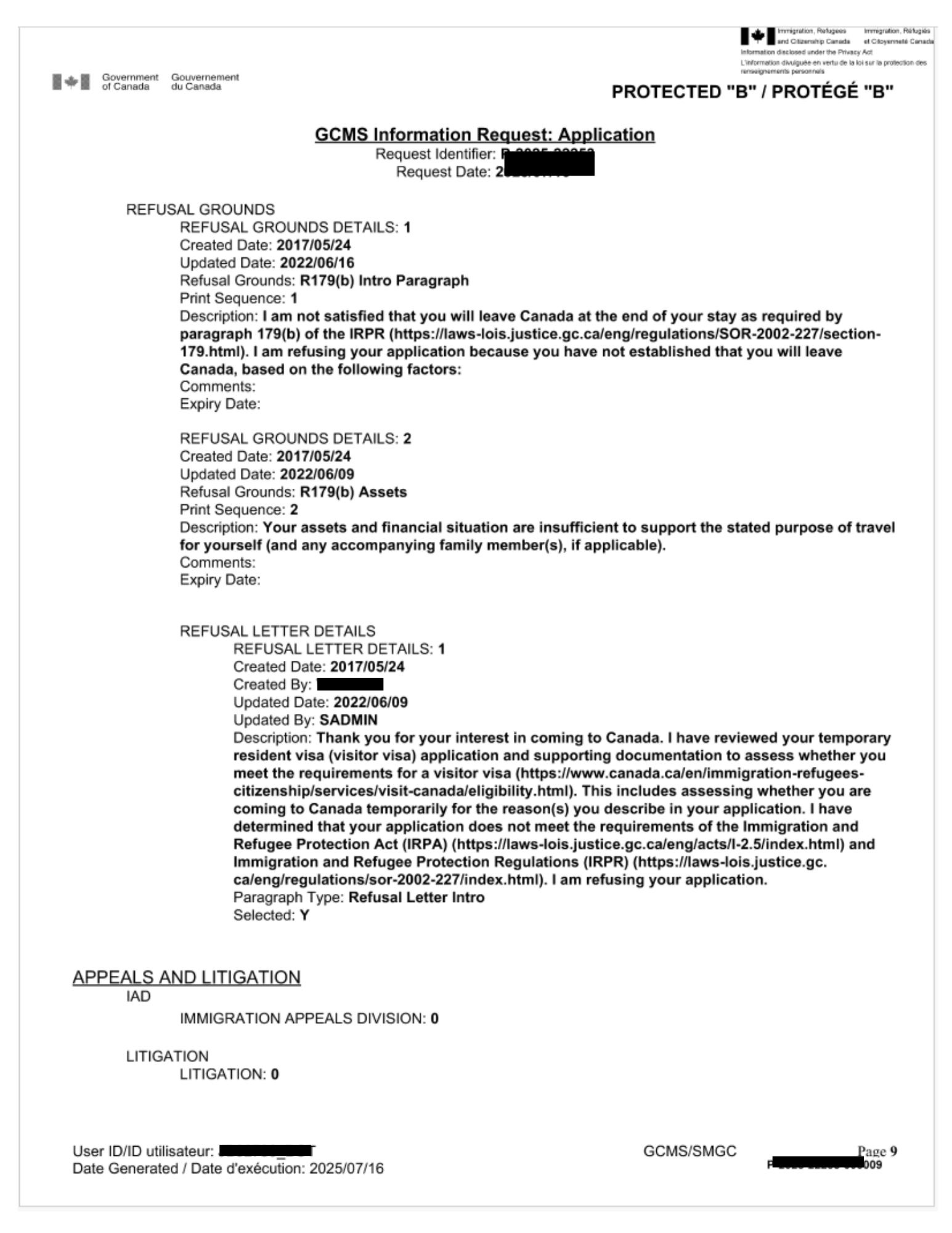
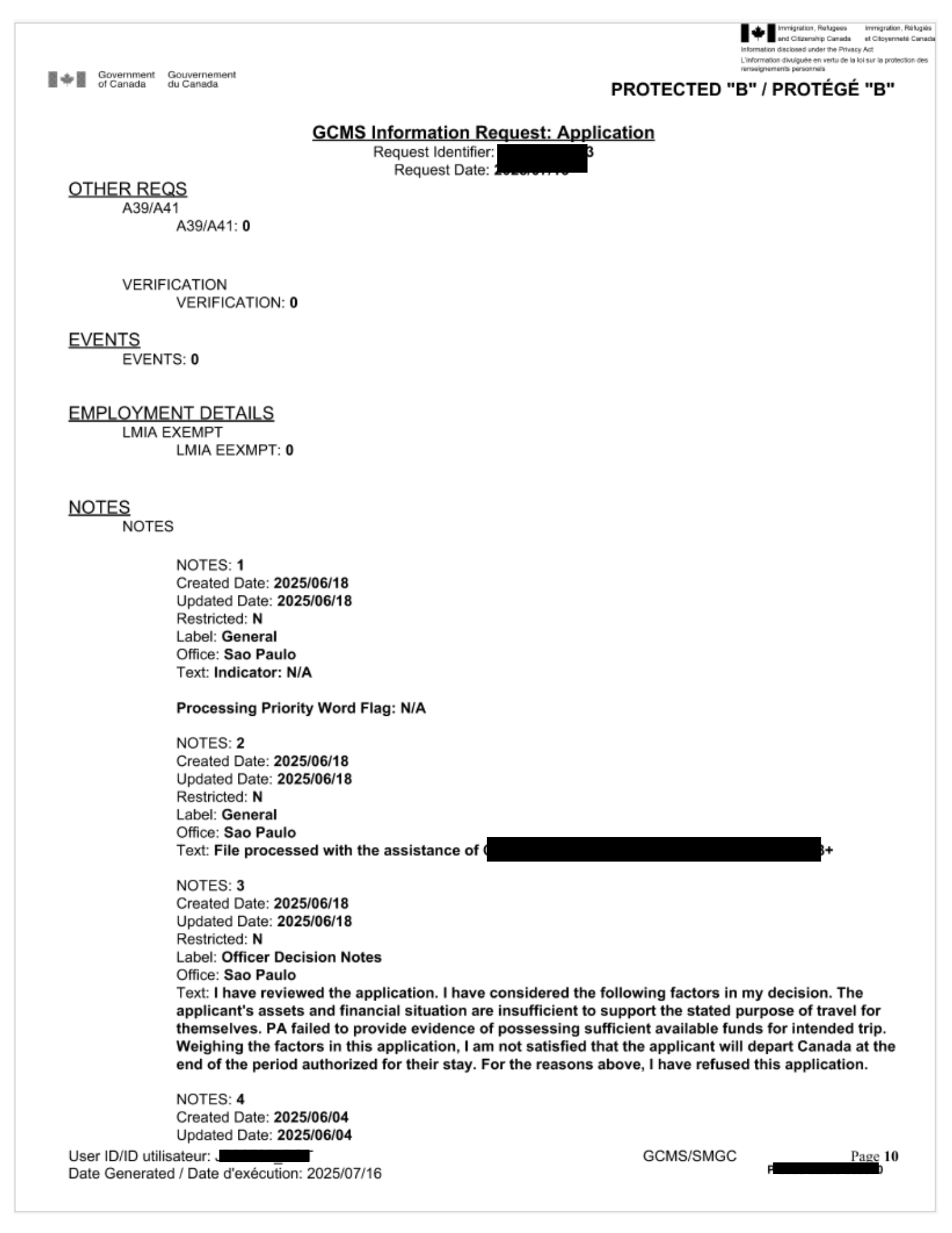
Sample GCMS Notes Report
Key Sections in a GCMS Notes Report
Applicant Information
This section contains your personal details as the system recorded them: full name, date of birth, UCI number, application number, and application type. It also shows the visa office handling your case and your application’s current status.
Case Notes (Officer Notes)
This is the most valuable section for most applicants. Case notes contain written assessments from immigration officers who reviewed your file. Each entry carries a date and may include observations about your documents, concerns about eligibility, interview notes, and processing decisions. Because officers frequently use abbreviations and internal codes, you may want to refer to our GCMS notes glossary for help understanding them.
Processing Activities
This section presents a chronological log of every action taken on your file: when IRCC received your application, when it assigned your file to an officer, when it initiated background checks, and when it recorded decisions. As a result, this timeline helps you pinpoint exactly where delays occurred.
Document Checklist
The document checklist shows which supporting documents IRCC received, which ones it still requires, and whether any documents raised concerns. If IRCC refused your application due to insufficient documentation, this section reveals exactly what went missing or proved problematic.
Security Screening Status
If you ordered CBSA GCMS notes or the bundle, this section displays the status of your background checks. Specifically, it indicates whether security screening has finished, remains in progress, or requires additional checks. For more on what CBSA notes contain, see our guide on IRCC vs CBSA GCMS notes.
What Will You Learn From Your GCMS Notes?
Your GCMS notes will tell you:
- The current processing stage of your application
- What officers have assessed and any concerns they noted
- Whether IRCC received and reviewed all required documents
- The status of background and security checks
- The reason for a refusal, if IRCC declined your application
- Whether a decision is pending or already finalized
Sample GCMS Notes by Visa Type
Although the format of GCMS notes stays consistent across all application types, the content of officer assessments differs based on what they evaluate. For example, study permit notes focus on acceptance letters, finances, and ties to your home country. In contrast, visitor visa notes focus on your purpose of visit and intent to return. Meanwhile, Express Entry notes focus on CRS score verification and eligibility assessment.
See our visa-type specific guides for details on what to expect: GCMS notes for study permit, GCMS notes for visitor visa, GCMS notes for Express Entry, GCMS notes for PR application, GCMS notes for citizenship, GCMS notes for work permit.
What a Refusal Looks Like in GCMS Notes
If IRCC refused your application, the case notes section will contain the officer’s reasoning. Unlike the generic refusal letter you receive from IRCC, GCMS notes reveal the specific factors the officer weighed. You will see which documents the officer considered insufficient, which eligibility concerns they flagged, and what ultimately led to the negative decision.
This information proves essential for building a stronger reapplication. After reviewing your notes, you may want to read our guide on what to do after receiving GCMS notes for next steps.
Common Abbreviations in GCMS Notes
GCMS notes use internal abbreviations and codes throughout. Some common ones include PA (Principal Applicant), SA (Spouse/Accompanying), BF (Background Check/Filing), VO (Visa Office), and R10 (referring to Regulation 10 of IRPR for application completeness). For a full reference, visit our GCMS notes glossary with status codes and their meanings.
How to Read Your GCMS Notes Effectively
Start with the case notes section first, as it contains the most actionable information. Then, read entries from newest to oldest to understand your application’s current state right away. Pay close attention to any flags or concerns that officers raised. If you see references to missing documents, additional verification, or security holds, these typically explain processing delays.
For legal matters or complex cases, consider sharing your GCMS notes with a Regulated Canadian Immigration Consultant (RCIC) or immigration lawyer. Our RCIC consultation services can help you interpret what the notes reveal about your case.
Frequently Asked Questions
Are all GCMS notes reports the same length?
No. The length depends on your application type, processing history, and how many officer interactions have taken place. A straightforward visitor visa may produce 5 to 10 pages, while a complex permanent residence case could run 30 to 50+ pages.
Will my GCMS notes show the final decision on my application?
If IRCC has already made a decision by the time it generates the notes, the report will typically include the decision rationale. However, if your application is still in process, the notes will show the current stage and any pending actions.
Can I see a sample before ordering?
GCMS notes are specific to each applicant and application, so a generic sample would not accurately reflect your actual file. That said, the sections described on this page remain consistent across all reports, giving you a clear picture of what to expect.
How does a GCMS notes sample for a study permit differ from a visitor visa?
The format remains the same, but the officer assessments focus on different criteria. Study permit notes assess your study plan, finances, and ties to home. Visitor visa notes, on the other hand, assess your purpose of visit and intent to leave Canada. The processing activities and document checklist sections follow an identical structure.
What is the difference between GCMS notes and the complete application file?
GCMS notes contain officer assessments and processing history. The complete application file, however, includes everything in GCMS notes plus all forms you submitted, supporting documents, and correspondence between you and IRCC. As a result, the case file provides the most comprehensive record available.
Order Your GCMS Notes
See exactly what your immigration file contains. Visit gcmsnotesrequest.ca to order your GCMS notes. We deliver your report as a secure, downloadable PDF to your account. Check the pricing on our gcms order page.