

How to Read GCMS Notes: Glossary, Status Codes and What They Mean
This guide is for applicants who have already received their GCMS notes and want to understand what each field, status, and officer note means in practice.
GCMS is IRCC’s internal case management system. Think of it as a single file that stores your forms, documents, officer checklists, partner responses, and the final decision. Every action leaves a dated entry. If you know what each entry represents, you can tell where your case stands and what, if anything, you need to do.
If you haven’t requested your notes yet, see how GCMS notes work and how to request them.
How to read a GCMS page quickly
- Start at APPLICATION header for the high‑level status and reason.
- Read ASSESSMENTS. These five fields tell most of the story: Eligibility, Criminality, Medical, Info Sharing, Security.
- Check NOTES for the narrative. Look for the latest officer note and labels like EE Eligibility, Adm/Security, General.
- Check DOCUMENT ISSUANCE for visas, eCOPR, or counterfoils.
Who and what appears in your GCMS file
- Your file holds the application form data, uploads, and fees. It has identifiers like UCI (Unique Client Identifier, also called a client ID) and the Application number.
- IRCC roles include intake clerks, case analysts, program assistants, and decision‑making officers. You will see their work in NOTES labels such as EE Eligibility, Adm/Security, or General.
- Partner systems include the RCMP and the Five Country Conference partners (Info sharing with the USA, UK, Australia, New Zealand, Canada). Their replies are populated under Criminality, Info Sharing, and Security blocks.
What each processing stage looks like in GCMS
Below is the typical path, with examples of what you will see in GCMS at each step. Streams vary, but the pattern is consistent.
1. Intake and completeness
IRCC registers the file, checks that required forms and fees are present, and triggers first tasks like biometrics and medicals when applicable.
What you’ll see in GCMS notes:
- App Status: Open, App Status Reason: In Progress
- Cost Recovery: Complete and fee lines like RPRF: Complete for PR
- System NOTES confirming UCI, consent, and basic metadata
- For EE, an intake note with CRS and lock‑in date
2. Biometrics and identity capture
You give fingerprints and a photo once per validity period. GCMS records these as where and when, then runs searches.
What you’ll see in GCMS notes:
- Biometrics – RCMP sub‑activity with statuses such as Received – NRT or Received – IMM
- Criminality: Passed – Bio once the fingerprint search returns clean
- Enrolment details like VAC or OGD, capture quality, and any finger exceptions
3. Eligibility review
IRCC verifies you meet the program rules. For TRV this covers purpose of travel, ties, funds, and history. For Express Entry it covers A11.2, points, job duties vs NOC, education, and work experience. Analysts can recommend a result and an officer finalizes it.
What you’ll see in GCMS notes:
- Eligibility: Passed or Review Required
- EE Eligibility or Case Analyst notes explaining the reasoning, for example, duties not verified or A11.2 met
- Document references by eDoc number and web checks on employers or schools
4. Admissibility checks
These are parallel background checks that confirm you are admissible to Canada. They include Criminality, Medical, Info Sharing, and Security. They do not always finish in order and they can continue after eligibility is done.
What you’ll see in GCMS notes:
- Medical: Passed with validity dates and IME numbers
- Criminality: Passed or Passed – Bio
- Info Sharing: In Progress, Complete, NRT, No Fingerprints with FCC partner lines
- Security: In Progress once referred, sometimes with Security Screening Type: Comprehensive and Received by CBSA SI
5. Fairness step (if concerns exist)
If the officer has serious concerns that could lead to refusal, you get a PFL with a deadline to respond.
What you’ll see in GCMS notes:
- NOTES: General stating PFL sent. Client has X days to respond.
- The letter appears in your account outside GCMS
6. Finalization and documents
When all required checks are cleared, the officer makes a decision and issues documents. TRVs receive a counterfoil in the passport. PR applicants receive eCOPR or CoPR.
What you’ll see in GCMS notes:
- Final: Approved then App Status: Closed, Reason: Approved
- DOCUMENT ISSUANCE block with visa or eCOPR details, including validity and where it was printed or issued
Why some GCMS statuses stay “In Progress” at the same time
Background lines can remain In Progress while others are Passed. For example, Info Sharing can still show In Progress even after Medical: Passed and Eligibility: Passed. That is normal and usually requires no action from you.
A Security entry marked Cancelled followed by a new In Progress entry usually means the original referral was replaced with a corrected one, not that the case is refused.
How to read dates and decide if you must act
- Use the Updated Date on each block to see the most recent movement, not just the top‑page dates.
- Look for Due Date fields, which drive IRCC reminders. If your note or request has a due date, act before it.
- If you receive a PFL or a request letter in your account, that is your cue to respond. Otherwise, most background statuses do not require uploads or emails.
How GCMS entries vary between visa and PR files
Visitor, study, and work files often show a Counterfoil entry when approved and then close quickly. While, Express Entry files show detailed eligibility notes, multiple info‑sharing lines, and explicit A11.2 language. They usually finalize after Security clears.
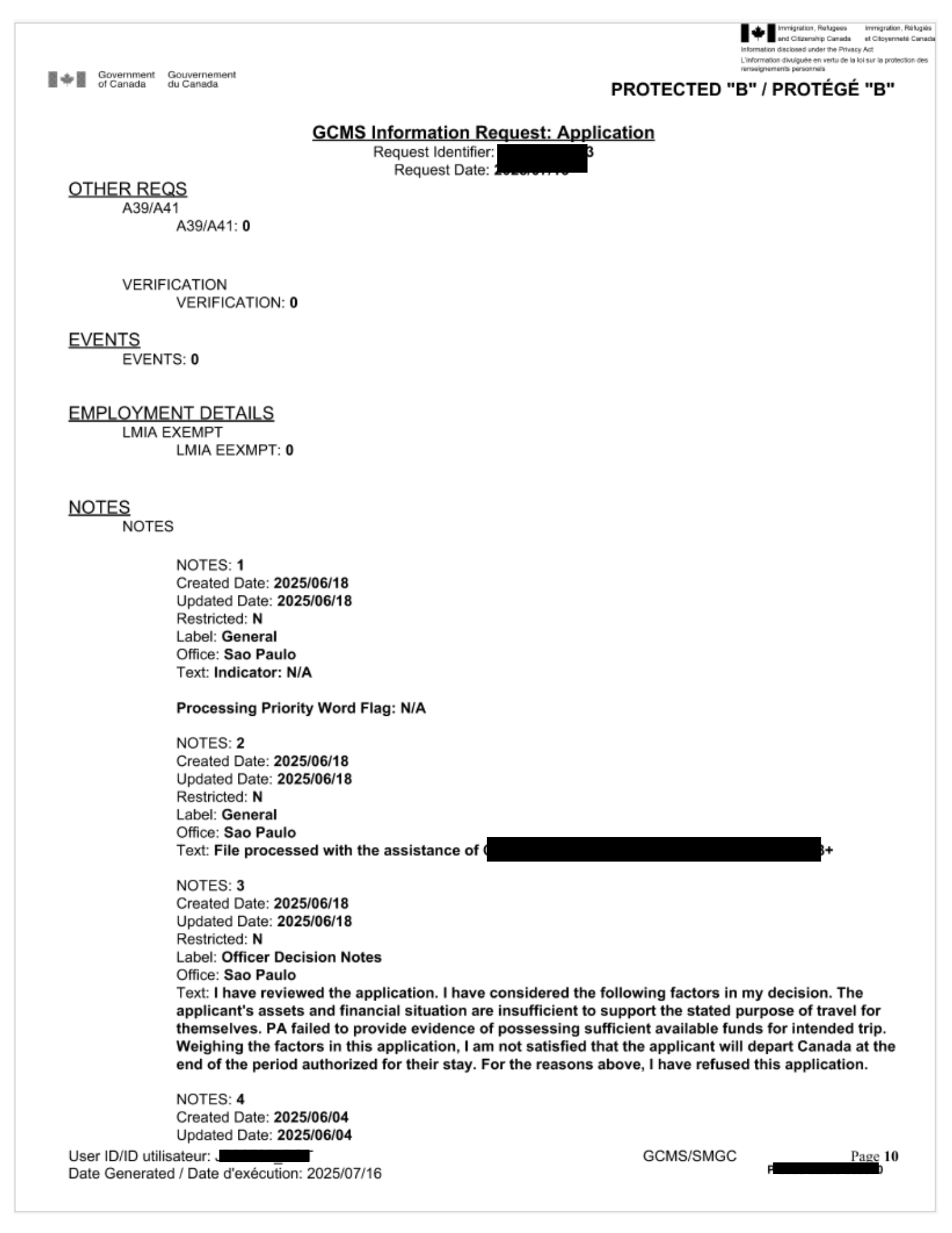
Status fields you will see often in your GCMS notes
Below is a quick table, followed by explainers with examples so you can map what you see in GCMS to real‑world steps.
| Field | Examples you will see | What it means | What to do as an applicant |
|---|---|---|---|
| App Status | Open, Closed | Whether the file is active. Closed after approval or refusal. | If Closed and Approved, watch for issuance details. If Closed with a refusal, review notes and letter. |
| App Status Reason | In Progress, Approved, Refused | A short reason tied to App Status. | Context only, rely on Assessments and Notes for the why. |
| Eligibility | Passed, Review Required, Met, Not Started | Program fit, documents, points. In Express Entry, includes A11.2 checks. | If Review Required, read the EE Eligibility or Case Analyst notes and supply missing clarity at the next request. |
| Criminality | Passed, Passed – Bio, In Progress | RCMP or police checks. Passed – Bio means biometrics search came back clean. | Usually passive. If police certs were requested, ensure they are valid and readable. |
| Medical | Passed | IRCC medical assessment result. | None unless re‑medical is requested. |
| Info Sharing | Complete, In Progress, NRT, No Fingerprints | Five Country Conference checks with partners. NRT means No Reportable Trace. | Wait. This runs in the background. |
| Security | In Progress, Not Started, Passed, Cancelled | CSIS or CBSA screening. Cancelled can mean a duplicate screening request was replaced. | Internal step. No documents to submit unless asked. |
| Final | Approved, Refused, Not Started | Final decision. | If Approved, see Document Issuance. If Refused, see refusal grounds and notes. |
Explainers with examples
- Eligibility
Think of this as the program rules checklist. For a visitor visa, it is about purpose of travel, ties, funds, and history. For Express Entry, it is CRS points, claimed work experience, education, and whether section A11.2 is met.
Review Required means an officer or analyst could not fully confirm a point from the documents. Example, a job letter does not list duties, so the analyst flags it for an officer to read more closely. It is not a refusal. It is a request for a closer look.
2. Criminality
This uses your fingerprints and any police certificates. When you see Passed – Bio, it means your fingerprints were searched and there was no record that affects admissibility.
If police certificates are unreadable, expired, or missing, the notes will say so and IRCC will ask for a new one.
3. Medical
Passed means a panel physician submitted results and IRCC accepted them. A validity date will appear. If a file is still processing when medicals expire, IRCC may ask you to do them again.
4. Info Sharing
IRCC checks with trusted partner countries. This is to confirm identity and any issues that could affect admissibility.
You might see In Progress for weeks. That is normal. It often continues after Eligibility or Medical have already passed because these checks run in parallel.
5. Security
This is a deeper screening that starts after eligibility looks good. If you see Security: In Progress and a note like C‑check submitted, it means the file was sent to the screening unit. There is no set timeline and there is nothing to upload unless IRCC contacts you.
6. Final
Once all the above are cleared, Final: Approved appears, then the document is issued. If refused, the notes explain the reasons and the letter lists the legal grounds.
Common short codes and acronyms
| Code | Long form | Meaning |
|---|---|---|
| UCI | Unique Client Identifier | Your permanent client number. |
| UGI / Party ID | Unique GCMS ID | Internal identifier for a person or party. |
| VAC | Visa Application Centre | Location where biometrics were taken. |
| OGD | Other Government Department | Biometrics captured at a non‑VAC, for example a Service Canada or Passport Office. |
| V‑1 | Counterfoil category | Visitor visa printed in passport. |
| TRV | Temporary Resident Visa | Visitor category. |
| CEC | Canadian Experience Class | Express Entry stream. |
| TFW | Temporary Foreign Worker | Subcategory tag in some PR files. |
| RPRF | Right of Permanent Residence Fee | PR fee. Complete means paid. |
| A11.2 | IRPR s.11.2 check | For Express Entry, CRS points must be valid at ITA and at e‑APR. A11.2 met means passed. |
| R87.1 | IRPR s.87.1 | CEC minimum requirements rule. |
| FCC | Five Country Conference | Info sharing with USA, UK, Australia, New Zealand, Canada. |
| PFL | Procedural Fairness Letter | IRCC asks you to respond to concerns before refusal. |
| PReVU | Pre‑verification utility | Internal identity and document cross‑check. |
| C‑check | Comprehensive security check | Request sent for security screening. |
| Chinook 3+ | Processing interface | IRCC tool used to triage and finalize, the decision is still by an officer. |
Biometrics and RCMP lines explained
Your fingerprints and photo are enrolled once per validity period. GCMS then shows sub‑activities that record how those prints were searched.
What the common lines mean
- Received – NRT: Your fingerprints were searched with the RCMP query and there was No Reportable Trace. This supports Criminality passing.
- Received – IMM: The system matched your prints to existing immigration records only. This is fine and is not a criminal hit.
- No Fingerprints: A partner system did not have prints to search, so only your name and date of birth were used for that check.
- Complete – Not Reviewed: A response came back and is waiting for an officer or automated check to log the result.
- Ready to be Assessed: The response is queued for an officer to clear.
An example from a real note
Criminality: Passed – Bio and a sub‑activity Biometrics – RCMP, Received – NRT
means the RCMP fingerprint search found nothing reportable. You do not need to send anything.
Fingerprint exceptions
If some fingers could not be captured, GCMS lists them under FINGERPRINT EXCEPTIONS. This is a capture note, not a refusal risk. Quality marked Good is typical.
Info sharing statuses you may see
IRCC has data sharing arrangements with partner countries often called the Five Country Conference. The goal is to confirm identity and flag issues that could affect entry. This is automated for the most part.
| Status | Meaning | What it looks like in practice |
|---|---|---|
| NRT | No Reportable Trace returned by a partner. | A clean response based on the query sent. |
| Complete, Not Reviewed | A partner sent a response and GCMS logged it, an officer or system has not marked it as reviewed yet. | You might still see In Progress at the high level until an officer reviews it through. |
| Ready to be Assessed | Response is waiting in a queue for review. | No action required from you. |
| No Fingerprints | The partner did not have fingerprints to search, so only name and date of birth were checked. | Common where you have never given prints in that partner country. |
| Additional Info Not Requested | No extra details were asked by the partner. | Routine. |
When you see Info Sharing: In Progress with entries like Biometric, FCC, Complete, Not Reviewed, it means partner systems have replied, the information is in your file, and IRCC still needs to mark the response as processed. This stage often continues while other stages like Eligibility or Medical are already passed. It does not block your file by itself.
Security screening lines
Security screening is a separate, deeper background check. It usually starts after eligibility looks good. There is no document you can submit to speed this up.
What you’ll see in GCMS notes
- Security: In Progress after a note like C‑check submitted. This indicates a referral to the screening unit.
- Security Screening Type: Comprehensive with Received by CBSA SI. This confirms the handoff to the screening partner.
- A Security entry marked Cancelled, followed by a new In Progress entry. This often means the first request was replaced with a new workflow or a corrected referral. It is not a negative decision.
What this means for you
- There is no fixed timeline. Files can remain in Security for weeks or months depending on the depth required.
- You do not need to upload anything unless IRCC explicitly asks. Keep your passport and contact details valid.
Document issuance, counterfoils and close‑out
For temporary visas you will see DOCUMENT ISSUANCE with a Counterfoil / Vignette and details like # of Entries: MULTIPLE, Valid To, print queue, and Sent Date. When issued, App Status becomes Closed with Approved as the reason.
For PR files, finalization appears as eCOPR or CoPR document creation, then Final: Approved and App Status: Closed.
Notes, labels and how to interpret them
- EE Eligibility or Case Analyst notes give the clearest reasoning. Example lines: A11.2 met, Eligibility passed, or Review Required due to duties not verified.
- Adm/Security notes often include DO NOT DISCLOSE. These are internal routing notes about security requests.
- General notes capture contact centre tickets, triage, system entries, or a PFL instruction.
Always read the most recent note first and align it to the Assessments block.
Now that you understand what each GCMS field means, the next section translates that knowledge into action. You will see which lines demand immediate attention and which ones are routine. We cover common “do I need to worry?” scenarios, how to respond to time‑sensitive requests like PFLs, and simple checks to keep your file moving.
What sample lines mean, with examples
Example 1: TRV approved
Eligibility: Passed, Criminality: Passed – Bio, Info Sharing: Complete, Final: Approved, plus DOCUMENT ISSUANCE with a Counterfoil entry.
What it means: Your visitor visa was approved and printed. The Counterfoil section lists the visa number, number of entries, validity, and where it was printed. App Status: Closed with Reason: Approved confirms the case is finished.
Example 2: Express Entry at mid to late stage
Eligibility: Passed, Criminality: Passed, Medical: Passed, Info Sharing: In Progress, Security: In Progress, with notes like C‑check submitted for PA.
What it means: You cleared program rules, medicals, and basic background checks. IRCC is waiting for partner responses and security screening to finish. Nothing is required from you.
Example 3: Review Required on eligibility
Eligibility: Review Required and an EE Eligibility note saying duties were not verified for a job period.
What it means: An analyst could not confirm that the job duties match the claimed NOC. An officer will take a closer look. IRCC may request clarifications or more documents. If you are proactively preparing, gather stronger letters, pay records, or supervisor contacts.
Example 4: PFL
PFL sent. Client has 7 days to provide a response.
What it means: IRCC has concerns that could lead to a refusal. You must reply by the deadline with documents and a clear explanation. Missing the deadline can result in refusal.
Example 5: Chinook processing note
File processed with the assistance of Chinook 3+.
What it means: An IRCC tool was used to organize or batch certain review steps. An officer still reviewed and signed off on the decision.
Interpreting progress by program
TRV example
A file showing Eligibility: Passed, Criminality: Passed – Bio, Info Sharing: Complete, Final: Approved and a Counterfoil entry means the visa is issued. App Status: Closed, Reason: Approved will follow.
Express Entry CEC example
Eligibility: Passed, Criminality: Passed, Medical: Passed, Info Sharing: In Progress, Security: In Progress with notes like C‑check submitted is a common mid‑to‑late stage. Finalization waits for security to clear.
How to tell what requires your action vs what is routine
Use this section as a triage guide. If a GCMS entry is marked urgent below, act promptly. Routine entries usually require no action unless a due date is specified.
Urgent
- PFL present with a deadline
Meaning: Officer has concerns that could lead to refusal.
What to do: Reply before the deadline with a short cover note and numbered evidence. If unclear, ask for a brief extension and explain why. Keep it factual. - Document request with a due date
Examples: police certificate, schedule A, re‑medical, updated passport, biometrics.
What to do: Upload within the window. If you cannot obtain it in time, upload proof of request and a note explaining expected timing. - Medical expiring while file is near final
Meaning: Validity is about to lapse.
What to do: If IRCC issued a re‑medical request, book it. If not, wait. Do not book on your own unless asked. - Passport validity expiring soon for TRV
Meaning: Counterfoil validity cannot exceed passport validity.
What to do: Renew early to avoid a short‑dated visa when requested. - Representative removal or change needed
Meaning: Wrong rep in application can slow communication.
What to do: File the correct Use of Representative form and notify through the account.
Routine
- Info Sharing: In Progress or Complete, Not Reviewed
Normal background step. It can remain open after Eligibility or Medical are passed. - Security: In Progress
Deeper screening underway. No uploads help unless IRCC asks. - Chinook 3+ note
Processing tool reference only. - Duplicate Security entry cancelled then re‑issued
Usually a workflow correction.
When to send a webform
- A due date is imminent and you cannot submit the document in time. Provide proof of attempts and request a short extension.
- You uploaded a requested item but the slot or status did not update after a reasonable time. Include the date, file number, and what you uploaded.
- Contact details changed. Provide the new phone or email and keep it consistent with your account.
Quick A to Z glossary
A11.2: Express Entry points validity rule at ITA and e‑APR.
Adm/Biometric: Label for operational biometric entries.
App Status Reason: Short reason that pairs with App Status, for example In Progress, Approved.
Case Type: 0: Internal default where a specific sub‑type is not set on that screen.
CEC: Canadian Experience Class.
Chinook 3+: IRCC interface used to review batches, officer still signs off.
Counterfoil Category V‑1: Visitor visa counterfoil. (Read other Canadian visa types and Counterfoil codes here)
CPC‑Ottawa: Centralized PR processing centre.
FOSS: Legacy system reference.
HIRV: High‑risk visa indicator category. Often blank.
In Progress: Work is underway on that assessment, not a refusal signal.
NOC 2021: Current occupation classification version.
NRT: No Reportable Trace returned from a biometric or info‑sharing search.
OGD: Other Government Department capture point for biometrics.
PFL: Procedural Fairness Letter requesting a response before a negative decision.
PReVU verified: Identity or document pre‑verification complete.
RPRF Complete: PR right‑of‑permanent‑residence fee paid.
Security Screening – Comprehensive: Full scope security referral.
VAC: Visa Application Centre where biometrics were enrolled.
V‑1: Visitor counterfoil code that prints on the visa.
Need help reading your notes?
If you want a line‑by‑line readout or a response plan for a PFL or Review Required, a focused review of your GCMS notes by an independent professional can save time. Contact us to learn more about our GCMS Notes Review Service.
This guide is informational. It does not replace legal advice.