

What are GCMS notes?
GCMS notes are internal records created in Canada’s Global Case Management System. This system is used by Immigration, Refugees and Citizenship Canada (IRCC) and the Canada Border Services Agency (CBSA) to manage and assess immigration and visa applications.
In simple terms, GCMS notes are a written record of how an immigration application is reviewed. They show what information officers have received, what checks have been completed, and what decisions or observations have been recorded so far.
GCMS notes can apply to many types of applications, including permanent residence, temporary residence (such as work permits or study permits), and visitor visas. The notes are stored electronically and updated as an application moves through different stages of review.
A typical GCMS file may include:
- A history of actions taken on the application
- Comments written by immigration officers
- Details about documents submitted or requested
- The current status of eligibility, background, and security checks
Together, these records explain how an application is being processed and what has happened behind the scenes.
What details are in GCMS notes?
GCMS notes contain a detailed, item-by-item record of how an immigration application is reviewed inside Canada’s immigration system. Each section reflects information entered or updated by IRCC or CBSA officers as the file is processed.
Below are the main types of information you will usually see:
Application status
This shows the current stage of the application in the system. It may indicate whether the file is waiting to be reviewed, actively being assessed, paused, or finalized. Status entries are time-stamped, so you can see when changes occurred.
Eligibility assessment
This section records whether the applicant meets the program requirements. Officers may assess factors such as work experience, education, language results, job offers, or relationship evidence, depending on the application type. Notes often show whether eligibility is marked as “not started,” “in progress,” or “passed,” along with brief explanations.
Security checks
Security screening relates to national security concerns. GCMS notes usually show whether security screening has not started, is ongoing, or is complete. Details are often limited or redacted for legal reasons.
Criminality checks
This part shows the review of police certificates and criminal history. It may reference background databases and whether criminality has been passed or is still under review.
Medical assessment
Medical results are tracked here. The notes may show whether medical exams were received, reviewed, passed, or expired, along with the date the decision was entered.
Officer notes and comments
These are written observations made by immigration officers. They may explain concerns, confirm findings, request clarification, or document reasons for a decision. If an application is refused, this section often explains the reasoning in detail.
Supporting documents
GCMS notes list documents submitted with the application and may flag items as reviewed, missing, unclear, or requiring follow-up. Officers may also note discrepancies between documents.
Case history and actions taken
This is a chronological log of actions on the file, such as when documents were received, when reviews started, or when decisions were recorded. It helps track how the application moved through the system.
Internal system and administrative notes
These entries include system-generated updates and internal processing steps. They may show file transfers between offices or references used internally by officers.
Taken together, these sections explain what information was reviewed, how decisions were formed, and where an application stands within the immigration process.
Most information held by IRCC can be accessed through these notes. The main exceptions are Cabinet documents and records whose release could affect national security, the economy, federal–provincial relations, or international affairs. For an official explanation of what information may be withheld under access-to-information or privacy laws, refer to IRCC’s access to information guidance.
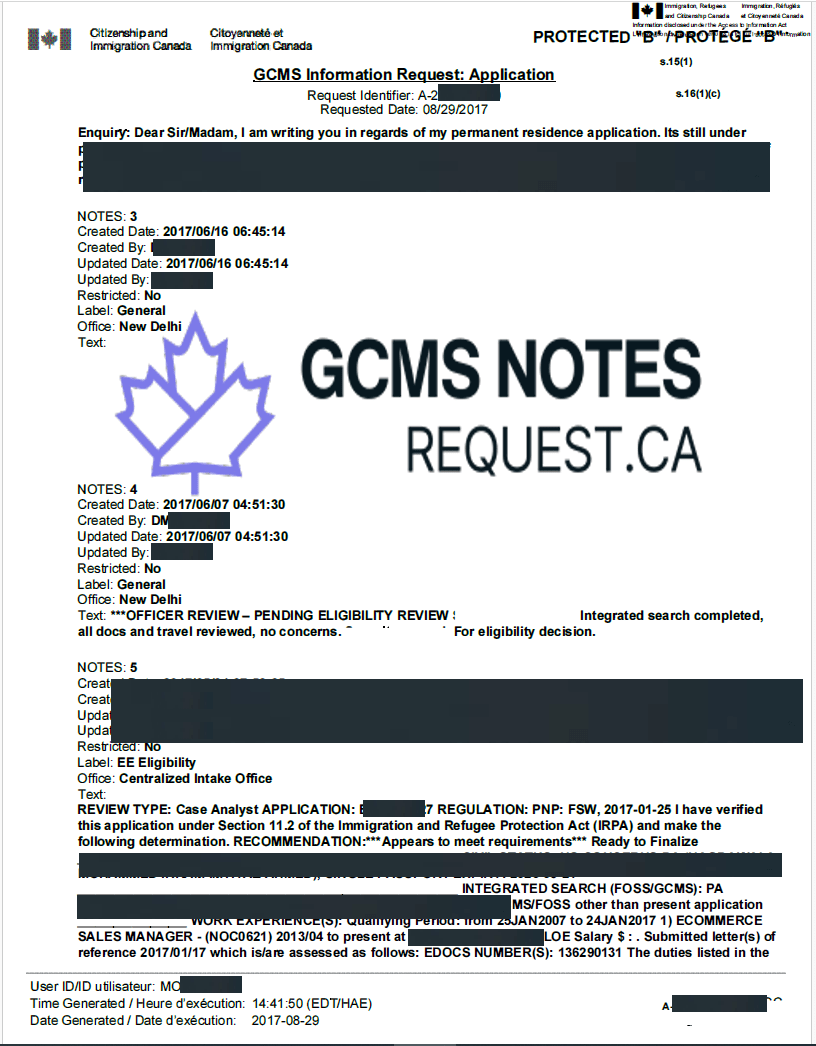
Sample GCMS notes
Here’s a sample of how Canadian Immigration GCMS notes look like:
IRCC vs CBSA GCMS Notes: What’s the Difference?
GCMS notes can be requested from different government bodies depending on where the information originates. While the underlying system is the same, the content and level of detail may vary slightly. Below is a neutral explanation of each option and when it is typically used.
GCMS notes from IRCC
These notes come from Immigration, Refugees and Citizenship Canada. They usually include application status updates, eligibility assessments, officer comments, and document reviews. IRCC notes are commonly used to understand how an application is being processed and whether program requirements have been met.
(See: GCMS notes from IRCC)
GCMS notes from IRCC (entire case file)
This version includes the full case file held by IRCC. In addition to officer notes and system entries, it may contain copies of forms, correspondence, decision records, and supporting documents submitted with the application. This option is often used when a complete record of the file is needed for review or reference.
(See: GCMS notes and entire case file from IRCC)
GCMS notes from CBSA
These notes are issued by the Canada Border Services Agency. CBSA records may contain additional detail related to security screening, background checks, or admissibility reviews. In some cases, information that appears limited or redacted in IRCC notes may be more visible in CBSA notes.
(See: GCMS notes from CBSA)
GCMS notes from IRCC and CBSA
Requesting notes from both IRCC and CBSA provides two perspectives from the same system. This can help clarify how different parts of an application are being reviewed and whether information appears differently across departments.
(See: GCMS notes from IRCC and CBSA)
Each option reflects a different source of records within Canada’s immigration system. The most relevant choice depends on which aspects of the application you are trying to understand.
When Should You Request GCMS Notes?
GCMS notes can be reviewed at different points during an immigration or visa application. They are most useful when an applicant wants to understand how a file is being handled internally or why a decision has not yet been made.
Common situations where GCMS notes are requested include:
Application delays
If an application has gone beyond the normal processing timeframe without updates, GCMS notes can show whether the file is waiting in a queue, actively under review, or paused at a specific stage. This helps explain delays that are not visible in online status tools.
Application refusals
Refusal letters are usually brief and do not include detailed reasoning. GCMS notes often contain the officer’s full assessment, including concerns, missing requirements, or inconsistencies that led to the refusal. This information is useful for understanding what happened before reapplying or appealing.
Requests for additional documents
When additional documents or information are requested, GCMS notes can provide context on why those items are needed. They may show which requirement was not met or what clarification the officer is seeking.
General status review
Some applicants request GCMS notes simply to understand how their file is progressing. The notes show what steps have been completed and which reviews are still pending, offering a clearer picture of the application’s position in the process. In these cases, applicants may later decide to order GCMS notes online to review that information in detail.
Legal preparation or appeals
For applicants working with legal representatives or preparing an appeal, GCMS notes help document how decisions were made and what evidence was considered. They provide a complete record of the assessments carried out by officers.
In all cases, GCMS notes are used to explain what has happened on a file, rather than to predict outcomes or timelines.
How long does it take to receive GCMS notes?
GCMS notes are generally released within 15 to 35 days from the date the request is received by the government authority.
The exact timing can vary based on:
- Which agency is processing the request (IRCC or CBSA)
- The size and complexity of the case file
- The number of requests being handled at the time
These timelines are based on statutory access-to-information rules and may change during periods of high volume. For a detailed explanation of timelines and extensions, see GCMS notes processing time.
Can you expedite GCMS notes?
There is no official process to expedite GCMS notes.
All requests are handled under Canada’s Access to Information and Privacy legislation, which sets standard response timelines. While complete and accurate information can help avoid administrative delays, applicants cannot control or accelerate how quickly the notes are released once the request is accepted.
What do you need to apply for GCMS notes?
Requesting GCMS notes requires specific information and documentation. The exact requirements depend on who is making the request and whose records are being requested.
The typical requirements include:
Consent form
If the request is made on behalf of an applicant, a signed consent form from the applicant is required. This allows the government to legally release personal immigration records.
Application identifiers
Basic file details are needed to locate the correct records, such as:
- Application number
- UCI (Unique Client Identifier)
- Type of application (for example, visitor visa, study permit, work permit, or permanent residence)
Proof of identity
A copy of a government-issued identity document linked to the application (such as a passport bio page) may be required to confirm identity.
Eligibility to submit the request
Under Canadian law, GCMS notes can be requested by:
- Canadian citizens
- Permanent residents of Canada
- Individuals or entities physically present in Canada
Applicants outside Canada must authorize an eligible requester through a consent form.
These requirements exist to protect personal information and ensure records are released only to authorized parties.
What are CAIPS and FOSS notes, and how do they differ from GCMS?
Before Before GCMS was introduced, Canada’s immigration system used two older databases.
CAIPS (Computer Assisted Immigration Processing System)
CAIPS was used mainly for processing visa applications outside Canada. It stored officer notes, decisions, and application data. CAIPS is no longer in use and has been fully replaced by GCMS.
FOSS (Field Operations Support System)
FOSS was used primarily for in-Canada enforcement and status tracking. It contained information related to entries, permits, and compliance. FOSS has also been integrated into GCMS.
Today, GCMS is the single system used by IRCC and CBSA. References to CAIPS or FOSS usually relate to older applications or historical terminology, but all current records are maintained within GCMS.
What Happens Behind the Scenes After You Apply for GCMS Notes?
After a GCMS notes request is submitted, it goes through a standard review process under Canada’s access-to-information laws. Several internal steps take place before the notes are released.
- Request registration: The receiving department, either IRCC or CBSA, records the request in the Access to Information and Privacy (ATIP) system. The request is assigned a reference number and placed in a processing queue.
- Consent verification: If the request is made for someone else’s records, officers review the signed consent form. If the consent is missing, incomplete, or unclear, processing may be paused until the issue is resolved.
- File retrieval: Once the request is accepted, the department locates the relevant immigration file in the Global Case Management System. This includes officer notes, system entries, and related records connected to the application.
- Review and redaction: Before release, an officer reviews the file and removes information that cannot be disclosed under privacy and security laws. Redactions may apply to third-party data, internal procedures, or security-related content.
- Compilation and release: After review and redaction, the records are compiled into a single document, usually a PDF. The finalized GCMS notes are then released to the requester using the method allowed under access-to-information rules.
This process is designed to balance access to personal records with legal requirements for privacy and confidentiality.
How to analyze GCMS notes?
GCMS notes are written for internal government use, so they often contain abbreviations, short codes, and brief comments. While they can look confusing at first, they follow a consistent structure. By reading them section by section, it is possible to understand what has happened on a file and what stage it is currently in.
Below are the main sections to focus on and how to read them.
Application Summary
This section provides a high-level overview of the application. It usually appears near the beginning of the notes.
You will find:
- The application type (for example, permanent residence or temporary visa)
- The date the file was created
- Current status (such as “In Progress” or “Finalized”)
- Important dates, including when reviews started or were updated
Think of this section as the timeline header. It helps you confirm basic facts and see how long the file has been active.
Officer Comments and Notes
Officer notes are short written remarks added during file reviews. These comments explain what the officer looked at and what they thought about specific parts of the application.
In this section, you may see:
- Reasons for approving or refusing an application
- Concerns about documents, employment history, or travel
- Notes about missing information or inconsistencies
- References to interviews or additional reviews
If an application was delayed or refused, the explanation is often found here in plain language, even if it is brief.
Eligibility, Criminality, Security, and Medical Checks
GCMS notes break background checks into separate categories. Each category usually has a status such as “Not Started,” “In Progress,” or “Passed.”
Common checks include:
- Eligibility: Whether the applicant meets program requirements
- Criminality: Police certificates and criminal record checks
- Security: Broader security screening conducted by partner agencies
- Medical: Immigration medical exam results
If an application appears stuck, one of these checks is often still in progress. The notes may not explain why a check is pending, but they show where the file is waiting.
Document Records and Checklists
This section lists documents received and reviewed by the officer.
You may see:
- Uploaded forms and supporting documents
- Dates documents were reviewed
- Notes indicating missing, unclear, or incomplete documents
When additional documents are requested, this section can help explain what triggered the request and whether the new documents were attached to the file.
Understanding Codes and Status Terms
GCMS notes frequently use short codes and internal status labels instead of full explanations. Learning these terms makes the notes much easier to read.
For clear explanations of common abbreviations and statuses, refer to the GCMS notes glossary and status codes, which breaks them down in simple language.
Final Tip
GCMS notes are meant to show what has already happened on a file, not to predict future decisions. They are best read slowly, one section at a time. In complex cases, immigration professionals may use these notes as part of a broader legal or advisory review, but the notes themselves are designed to document facts and officer observations rather than provide guidance.
Tips for avoiding common mistakes when requesting GCMS notes
Requesting GCMS notes is usually straightforward, but small errors can delay processing or result in incomplete records. The points below focus only on common issues to watch for.
- Use the correct consent form
Make sure the consent form is fully completed, dated, and signed where required. Missing signatures or incomplete fields are a frequent cause of delays. - Provide accurate application details
Double-check identifiers such as the application number, UCI, and full name. Even minor spelling differences can prevent the records from being matched correctly. - Select the appropriate agency
GCMS notes can come from IRCC, CBSA, or both. Each source may hold different parts of a file, so it is important to choose based on what information is needed. - Allow enough time
GCMS notes follow statutory timelines. Submitting a request well before a personal deadline helps avoid unnecessary stress if processing takes longer than expected.
Frequently asked questions
What is the difference between CAIPS and GCMS notes?
CAIPS (Computer Assisted Immigration Processing System) and GCMS (Global Case Management System) notes are both used in the context of Canadian immigration applications. CAIPS notes were used for processing immigration applications outside Canada until 2010. They contained detailed records of an applicant’s immigration file, including officer notes, documents, and correspondences. GCMS notes, introduced in 2010, replaced CAIPS and now cover all types of immigration applications, both inside and outside Canada. GCMS is a more comprehensive and integrated system, providing detailed, up-to-date information on the status of an application, including the applicant’s history, correspondence, and officers’ remarks. Essentially, GCMS is the modern and more expansive successor to CAIPS, reflecting a more unified approach to case management.
What is the difference between CBSA and IRCC GCMS notes?
CBSA and IRCC GCMS notes are very similar since they both use the Global Case Management System (GCMS) platform. However, CBSA notes typically include security details that are not redacted, and they contain all the information related to your file with CBSA. IRCC notes, on the other hand, may not include as much detail on security aspects.
Can I find out the reason for refusal in GCMS notes?
Yes, GCMS notes help you understand why your application was refused. They can reveal if the reviewing officer made an error, allowing you to potentially get your case reopened. Additionally, GCMS notes provide valuable insights to help you avoid making the same mistakes when re-filing your application.
Does ordering GCMS notes delay immigration file processing?
No, ordering GCMS notes does not delay your file processing. It has no negative impact, and you can order as many notes as you like. In some cases, ordering GCMS notes can even prompt movement on your file, as an officer reviews it before releasing the notes. Therefore, ordering GCMS notes is safe and sometimes beneficial.
Can GCMS notes guarantee application approval?
No, GCMS notes provide insights into your application but cannot guarantee visa approval.
How long are visa refusal documents retained by IRCC?
IRCC retains entire case file related documents for 2 years after the last administrative action. However, CAIPS/GCMS files are available for up to 10 years after the last administrative action.
Conclusion
GCMS notes are internal records used by Canadian immigration authorities to document how an application is reviewed. They show application history, officer observations, background check statuses, and document reviews. When read carefully, they help explain delays, refusals, or ongoing processing without relying on speculation.
This guide is intended to explain what GCMS notes are, what information they contain, and how to read them in a clear and factual way. For readers who later need access to their own records, information about how to order GCMS notes online is available on the homepage, but the purpose of this article is to support understanding, not to replace professional or legal advice.